
Portfolio with no experience: what to put on your page
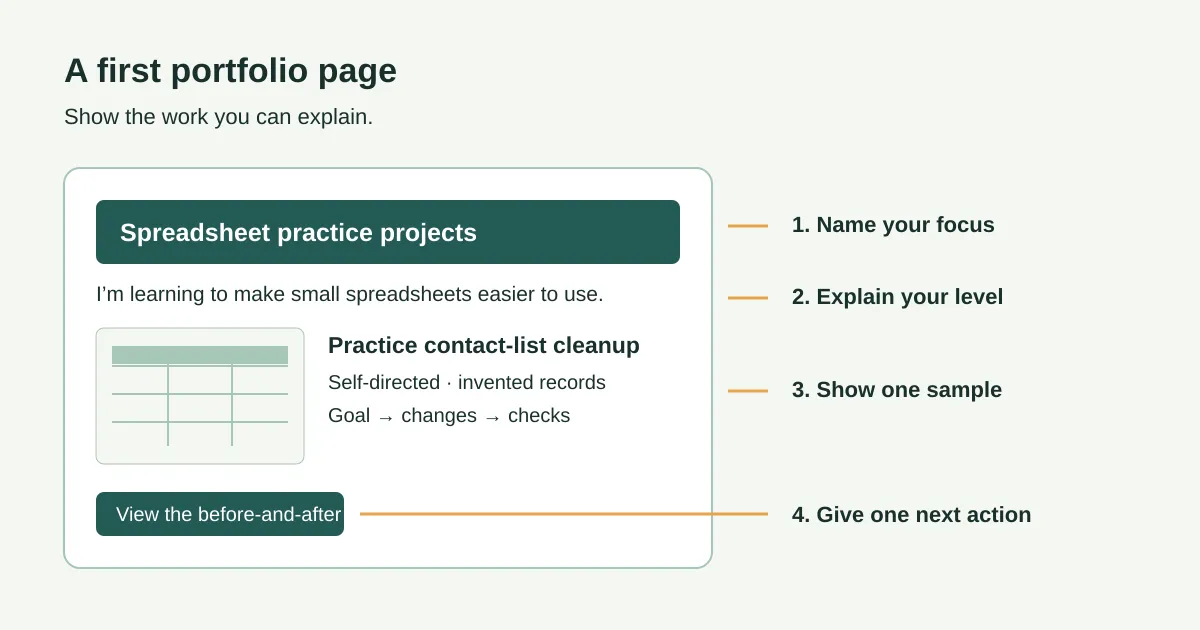
A portfolio with no experience can show self-directed projects, coursework, or volunteer work you’re allowed to share. Put a plain introduction, a sample of your own work, a short explanation of how you made it, and one next action on your first page. If you have no samples yet, finish a small practice project before designing the website; you don’t need to invent clients or achievements.
What should a portfolio with no experience include?
A beginner portfolio needs evidence of what you can do now. Start with one complete project you can explain, then add more when they show something different. One project is a starting point for a first page, not a promise that it will meet every employer’s application requirements.
| Page section | What to write | What to leave out |
|---|---|---|
| Headline | Your focus: “Spreadsheet practice projects” | Unsupported titles such as “expert consultant” |
| Introduction | What you’re learning or doing, and who the work is for | A long apology for being new |
| Sample | The actual work, its context, and your contribution | Template screenshots presented as your design |
| Process note | The goal, a decision you made, and what you checked | Results you didn’t measure |
| Next action | “View the before-and-after” or a suitable contact route | Several competing buttons |
Want to see these words together? In Loomera’s free planner, review the practice-poster example—teaching copy, not your own work—or start your own blank page essentials. Keep this guide open in another tab so you can return to the project-selection advice below.
For a job application, check the requested format, project count, and submission rules first. A public website may support an application without replacing a required PDF or other submission.
Choose work you can honestly claim
You don’t need paid clients to demonstrate a skill. You do need to make the source of the work clear.
- Self-directed project: describe the brief you set yourself and the finished output. Say “self-directed practice project” beside the sample.
- Course assignment: name it as coursework and explain what you personally made. Follow any course rules about sharing assignments.
- Group project: separate your contribution from the team’s. “I wrote the instructions and tested the formulas” is clearer than “I built the system” if others did the rest.
- Volunteer work: describe the real task and get permission before sharing private material, names, or internal files.
- Tutorial exercise: credit the tutorial. Explain which parts you followed and which you changed independently; don’t imply the entire design or solution was yours.
These are also the starting materials suggested in Wix’s beginner portfolio guide. The important next step is giving the viewer enough context to understand the work, rather than simply uploading it.
Keep confidential work out of a public portfolio. If you can’t share an original, make a separate practice sample using invented inputs and describe it that way. Don’t assume removing a name makes a real client file safe to publish.
If you have no samples, make one small project
Choose a task with an output someone else can inspect. “Learn spreadsheets” is too broad; “clean up a small contact list and explain the checks” gives you a sample.
| Skill you want to show | Manageable practice project | Evidence to include |
|---|---|---|
| Writing | Rewrite a confusing announcement you wrote yourself | Original, revision, and why you changed it |
| Spreadsheets | Organize an invented contact list | Before-and-after file and a checking note |
| Web development | Build a simple information page for an invented activity | Working page, your code, and known limitations |
| Design | Create an invitation for an invented event | Finished piece, an earlier version, and layout decisions |
Pick the project closest to the work you want to do next. Finish its core task before adding animations, a logo, or extra pages. A visible limitation is useful information: “This page has no booking form” tells a reader what the web project actually does.
Turn a practice project into a clear description
Say you’re learning spreadsheets and create a contact-list exercise using 12 invented records. You deliberately include inconsistent capitalization, one repeated record, and two missing email addresses. Your goal is to make the list readable and flag problems without guessing missing information.
Keep the original sheet, make a separate cleaned version, and record your changes. Check the repeated record before removing it; identical names alone wouldn’t prove that two real people were duplicates. Leave missing addresses blank and flag them for review.
Your project entry could read:
Practice contact-list cleanup
Self-directed spreadsheet exercise using invented records.
Goal: make a small contact list easier to read and identify records needing review.
My work: standardized capitalization, removed one deliberately repeated record, and flagged two missing email addresses.
Checks: compared the original 12 records with the 11 remaining records and confirmed that the removed row was the intended duplicate. I checked that both missing addresses were still flagged rather than filled with guesses.
Next improvement: add a check for accidental spaces at the start or end of entries.
The description shows an output and a checking method. It doesn’t claim that a business saved time or that the sheet improved sales. If you haven’t measured an outcome, describe what changed in the work itself.
To follow this example, make your own files first. Share a view-only copy or screenshots with readable headings, and keep your editable original separately. A process description without the sample gives the visitor little to assess.
Write an introduction without apologizing or exaggerating
Name your focus and current level, then point to the work. For the spreadsheet project, a first-page introduction could be:
Spreadsheet practice projects
I’m learning to make small spreadsheets easier to read and check. These self-directed exercises show the original inputs, my changes, and the checks I used. Start with the contact-list cleanup below.
If you’re looking for an opportunity, add the kind you actually want: feedback, an internship, or a clearly scoped task you can already deliver. Don’t advertise a paid service just because a portfolio template contains a “Hire me” button.
Use a contact route you’re comfortable making public. You can also make the main action “View the project” if sharing the sample is the page’s immediate job. A personal photo, testimonials, and a custom logo aren’t needed to explain this first project.
Check the page before you share it
- Check authorship: can a visitor tell what you made, what came from a tutorial, and what others contributed?
- Check access: open the published page and sample links while signed out. An editor preview or a private file link won’t show visitors the work.
- Check the sample on a phone: make sure screenshots, column headings, and project notes are readable. Offer a closer view if the full sheet is too small.
- Check claims: remove invented clients, credentials, testimonials, and unmeasured results. Put practice context beside the relevant project.
- Ask someone to read it: “What skill does this show? Which part did I do? What would you open next?” Revise the section that leaves them guessing.
If your samples cover unrelated skills, lead with the one relevant to the visitor. You can keep an archive elsewhere; your opening page doesn’t need to contain everything you’ve ever tried.
Draft the words, then choose where to publish
If you’re drafting in the planner, download the filled brief as .txt before leaving or reloading. To continue later, open the blank brief, choose that file under “Resume a saved brief,” review it, and confirm loading.
When the copy and sample are ready, follow the first-website publishing path. If you’re still deciding whether you need a portfolio page, a blog, or an offer, start with the guide to choosing your first online result.